A product lawyer and a litigation paralegal can ask an AI tool the same question: “What matters in this record?” They should not receive the same answer.
The lawyer may need controlling authority, counterarguments, and unresolved business risk. The paralegal may need a chronology, evidentiary gaps, and the next required filing. Both need the tool to state jurisdiction and date assumptions rather than silently choosing them.
Personalization supplies durable role, context, response preferences, and verification standards before a prompt begins. It does not make the tool a lawyer, provide missing facts, eliminate hallucinations, or replace professional judgment.
Personalization is saved. A prompt is typed.
Set this up in five steps
Define your role. Name the legal function and the decisions or deliverables you own.
Set durable context. Add practice area, jurisdiction when useful, and organization type.
Add verification rules. Require assumptions, missing facts, and claims needing current-source review.
Choose your chat platform. Start from its ordinary browser chat and follow the visual path below.
Test safely. Use a fictional or approved sample, compare the output, and refine only the standing instructions.
See what personalization changes
Use a fictional or otherwise approved sample record and this neutral test prompt:
Using only the supplied facts, identify what matters in this record. Separate known facts, missing facts, inferences, and recommended next steps.
Without role context
The tool must guess the audience, decision rights, level of detail, and preferred deliverable. A polished topical summary may still be the wrong work product.
With product-counsel context
A useful response should foreground the decision, legal and business risk, counterarguments, missing approvals, and claims requiring authority verification.
With litigation-paralegal context
A useful response should foreground chronology, record support, evidentiary gaps, procedural dependencies, and the next record-building task.
The model may still be wrong. Personalization changes the expected answer shape; it does not prove the answer.
Before you personalize
Use only durable, nonconfidential information approved for this specific tool, account, tenant, and use.
Exclude client identities, matter facts, privileged or potentially privileged material, work product, credentials, and secrets.
Confirm retention, training, access, security, and deletion rules before entering any matter information.
A matter-specific chat does not make an account or workflow approved.
Copy the legal starter block
Replace the bracketed terms with approved standing context.
Recommended legal personalization
I am a [lawyer, paralegal, or legal-operations professional] focused on [practice area] in [jurisdiction, if relevant], working for [organization type].
For legal-context questions, calibrate the response to my role. State jurisdiction and date assumptions, separate facts from inferences and recommendations, flag missing facts, and identify claims requiring current-source verification. Never invent citations, authorities, quotations, or facts.
Treat every material legal proposition, citation, quotation, deadline, procedural requirement, and jurisdiction-specific conclusion as unverified until I independently check it against a current primary or otherwise authoritative source.
Lead with the answer. Be succinct and high-signal. Use MECE structure when useful. Do not use em dashes.
Completed role examples
Lawyer example: I am product counsel focused on privacy and AI governance in the United States, working for a technology company.
Paralegal example: I am a litigation paralegal supporting commercial disputes in California, working in a corporate legal department.
Legal operations example: I am a legal-operations professional focused on intake, matter management, and outside-counsel operations for a multinational company.
Personalization is not prompting, memory, a skill, or a runbook
Five instruction layers and the legal problem each one solves
Layer · What it does · Legal example
Personalization
What it does: Establishes standing context and response preferences
Legal example: State jurisdiction assumptions and lead with practical consequences
Prompt
What it does: Defines one task and supplies its facts
Legal example: Compare two indemnity clauses under New York law
Memory
What it does: Retains selected information where available and enabled
Legal example: Remember a preferred writing format
Skill
What it does: Encodes a reusable procedure with inputs, outputs, and checks
Legal example: Run a structured legal-risk assessment
Runbook
What it does: Connects skills, tools, and human decisions into a workflow
Legal example: Coordinate intake, research, drafting, verification, and approval
The distinction matters because a standing instruction follows you into later chats, while the facts and objective of a legal assignment belong in the prompt for that assignment. A skill adds a repeatable method, such as the ordered checks for a risk assessment. A runbook connects several methods and human decisions. Keeping these layers separate makes an instruction easier to test, revise, and govern.
After saving approved personalization, run the neutral sample prompt once in a fresh chat. Check whether the response identifies assumptions, distinguishes facts from inferences, flags missing information, and marks claims for source review. If one element is missing, revise that standing instruction and test again. Do not judge the setup by tone alone. A response can sound polished and still omit the verification behavior that legal work requires.
The four elements of useful legal personalization
Professional role: identify the role closely enough to change the response, then state the responsibility or deliverable.
Legal context: include durable practice area, jurisdiction, organization type, and recurring work type when they matter.
Output preferences: specify answer-first structure, brevity, distinctions between analysis and recommendations, or MECE organization when useful.
Verification rules: require assumptions, missing information, and source-verification flags. Formatting alone cannot improve legal accuracy.
Choose your chat platform
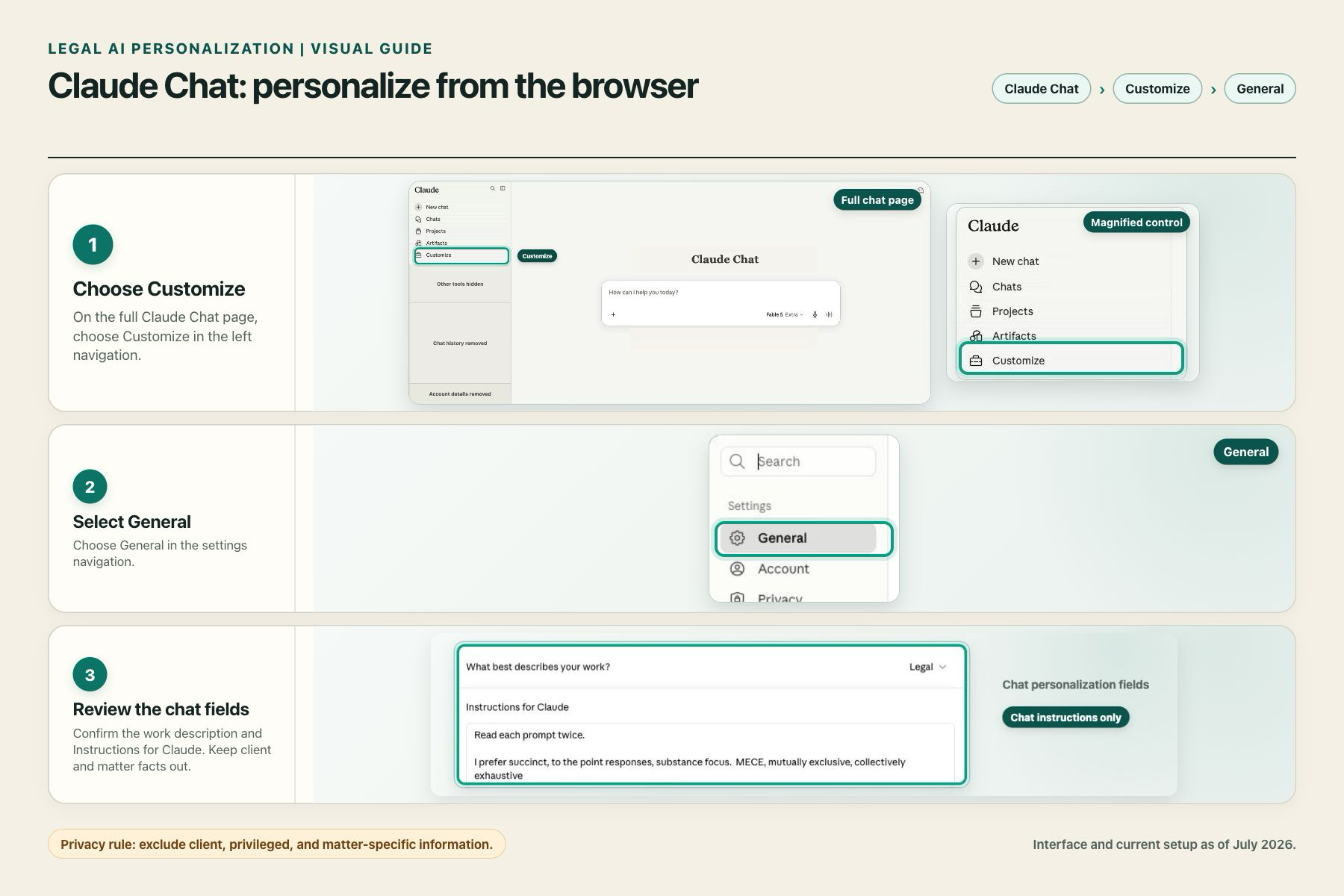
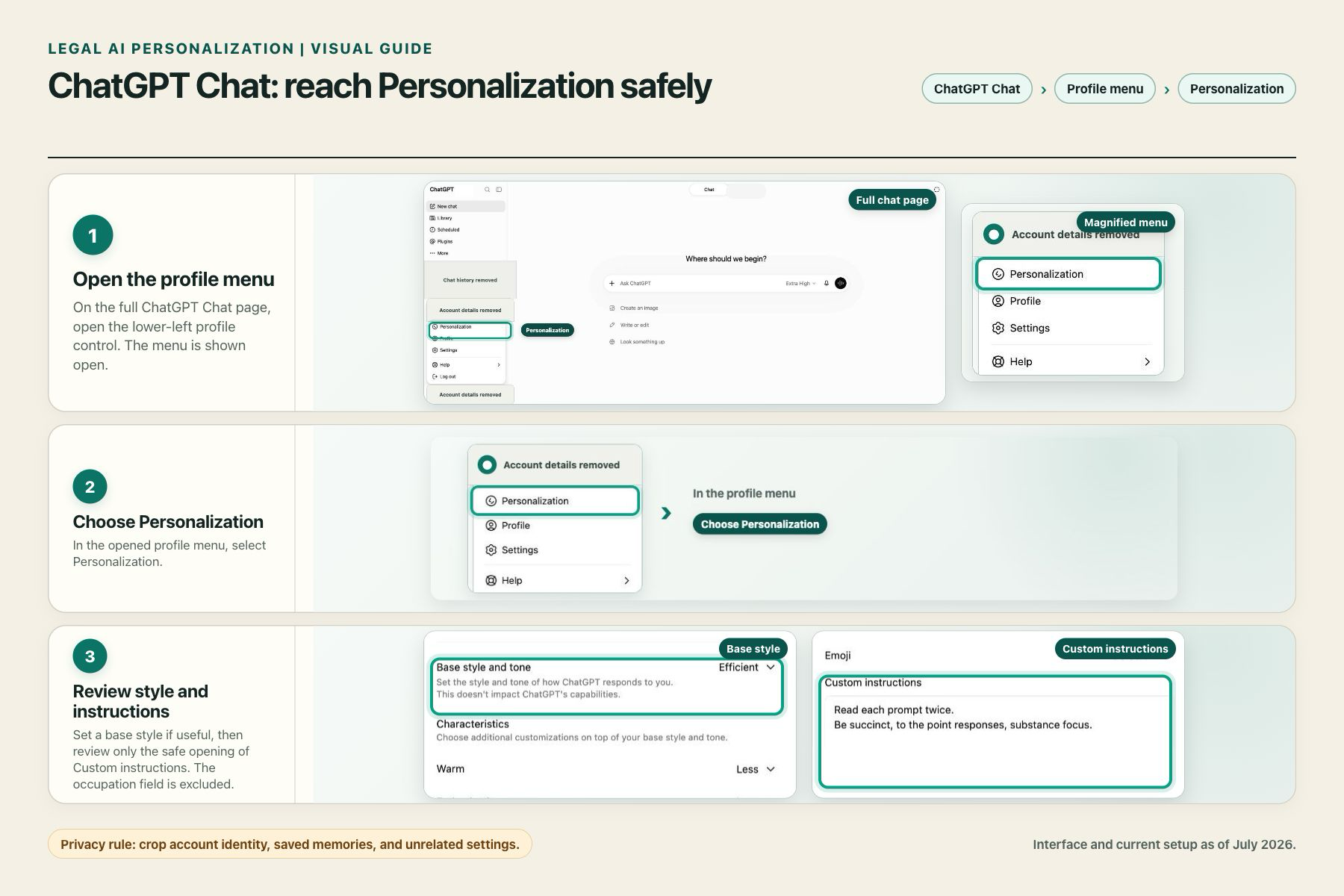
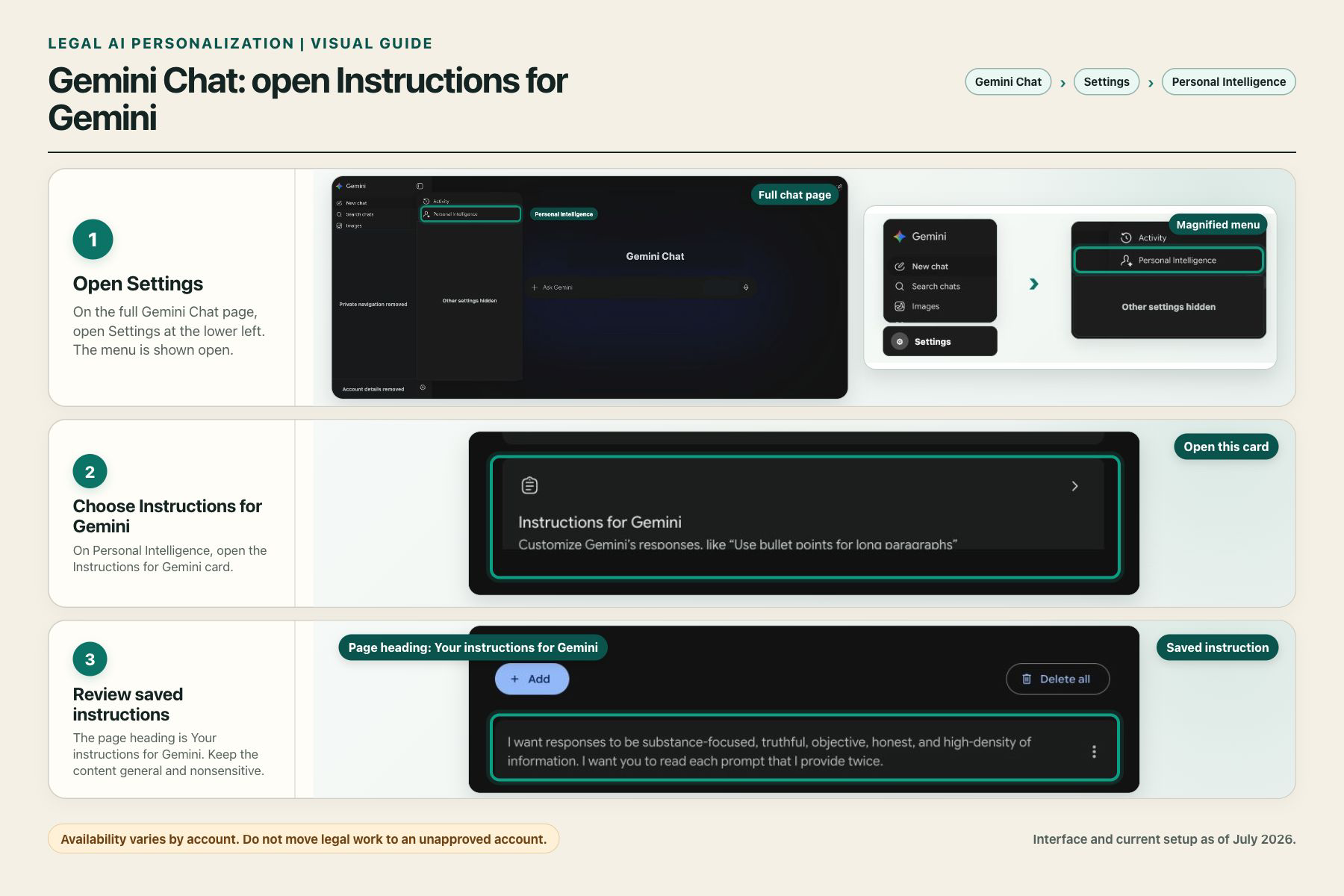
These walkthroughs begin in the ordinary browser chat. Step 1 pairs a privacy-safe full-page view with a magnified view of the control to use. The remaining steps follow the route to the relevant fields. The controls are not in the same corner on every platform.
Interfaces vary by account, plan, client, region, workspace, and administrator settings. These privacy-safe guides show paths observed in the captured accounts in July 2026. They show where to configure standing context, not a recommended legal configuration or a complete account setup. If your screen differs, use the product's settings search or help documentation and confirm the labels before entering anything.
Claude: Customize → General
ChatGPT: Profile menu → Personalization
Gemini: Settings → Personal Intelligence
Claude
From Claude Chat in the browser, choose Customize in the left navigation, then open General. Review “What best describes your work?” and “Instructions for Claude.” Anthropic describes standing instructions as part of Claude’s personalization features.
ChatGPT
From ChatGPT Chat in the browser, open the profile menu at the lower left, then choose Personalization. Review the base style and Custom Instructions. OpenAI similarly separates preferences that apply across chats from details supplied in the current prompt.
Gemini
From Gemini Chat in the browser, open Settings at the lower left, then choose Personal Intelligence and Instructions for Gemini. Google says saved instructions require a personal Google Account and are unavailable for work, school, or supervised accounts. Do not move legal work to an unapproved personal account merely to obtain this feature.
What should never enter persistent personalization
Persistent instructions are the wrong place for client-confidential, privileged, potentially privileged, work-product, protective-order, trade-secret, credential, or matter-specific information. The duty of confidentiality is broader than attorney-client privilege, and disclosure consequences depend on the facts, tool, terms, controls, consent, and governing law.
Before entering matter information, ask:
Is this specific tool, account, tenant, and use approved for the information?
What are the provider’s retention, training, access, security, and deletion rules for this account?
Do law, professional duties, client commitments, protective orders, and organizational policy permit the intended use?
The American Bar Association’s Formal Opinion 512 identifies duties involving competence, confidentiality, communication, supervision, candor, and fees. Applicable jurisdictional rules may differ.
Common mistakes and limits
Do not write an autobiography. Include only stable facts that change the response. Do not rely on style instructions alone. “Be concise” does not tell a model to state jurisdiction assumptions or verify authority. Do not treat “never invent citations” or any standing instruction as a technical control. Review and system permissions remain separate safeguards.
Review personalization when roles, laws, tools, account controls, or organizational policies change. Better calibration can improve relevance and consistency. It cannot determine whether a source is current, resolve missing facts, or decide whether a recommendation fits the client’s objectives and risk tolerance.
Next in the series
Legal AI Skills: How to Turn a Playbook into a Reusable Procedure will explain how to research, encode, and test a reusable legal procedure without publishing proprietary or matter-derived methods.
Prompting defines the task. Personalization establishes standing context. Skills and runbooks make the method repeatable.